Custom Gaming PC Build Manual
This manual documents a custom Windows 11 Pro gaming PC based on AMD AM5, DDR5 memory, NVMe storage, and a Radeon graphics card.
Final Build Reference
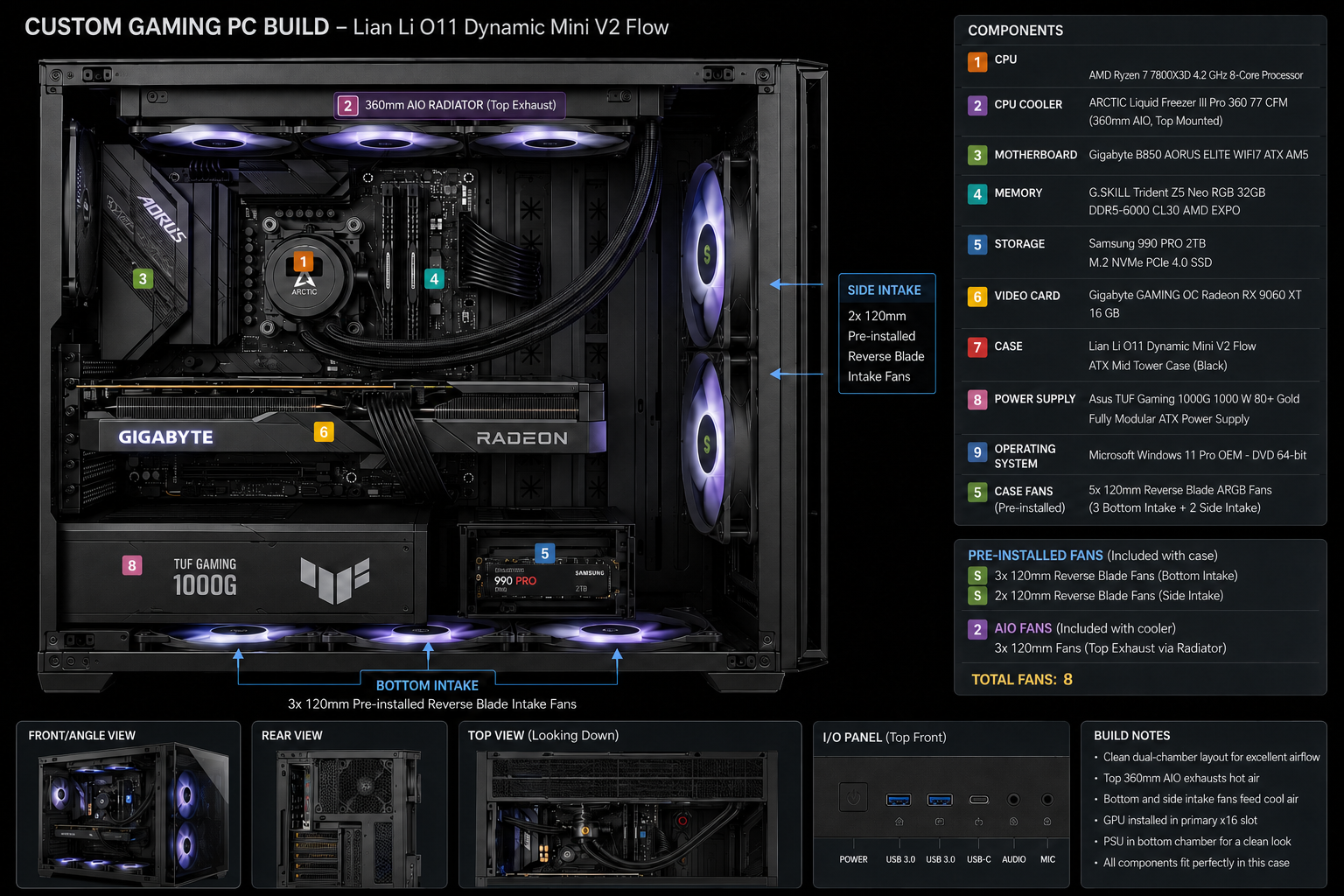
Section titled “Final Build Reference”The image below is a visual reference for the completed build. Use it as a layout and appearance target only; use the model numbers in the Bill of Materials as the authoritative component reference.
Build Specification
Section titled “Build Specification”| Category | Component | Part number |
|---|---|---|
| CPU | AMD Ryzen 7 7800X3D | 100-100000910WOF |
| CPU cooler | ARCTIC Liquid Freezer III Pro 360 | ACFRE00180A |
| Motherboard | Gigabyte B850 AORUS Elite WiFi7 | B850 AORUS ELITE WIFI7 rev. 1.x |
| Memory | G.SKILL Trident Z5 Neo RGB 32GB DDR5-6000 CL30 AMD EXPO | F5-6000J3038F16GX2-TZ5NR |
| SSD | Samsung 990 PRO 2TB NVMe | MZ-V9P2T0BW |
| GPU | Gigabyte Radeon RX 9060 XT Gaming OC 16GB | GV-R9060XTGAMING-OC-16GD |
| Case | Lian Li O11 Dynamic Mini V2 Flow | O11DMIV2FX |
| Power supply | ASUS TUF Gaming 1000W Gold | TUF-GAMING-1000G |
| Operating system | Windows 11 Pro on USB installation media | n/a |
Start Here
Section titled “Start Here”Use the guide in order:
- Confirm the components and bill of materials.
- Prepare the tools and workspace.
- Install the CPU, SSD, memory, motherboard, cooler, PSU, and GPU.
- Complete first boot, BIOS configuration, Windows installation, and driver installation.
- Enable EXPO, apply gaming optimisation, and record the benchmark baseline.
- Use the Operations overview for monitoring, maintenance, backups, security, troubleshooting, and future upgrades.